Ministry · Events

The whole family, registered in one tap. $0 ticket fees.

Publish the Niagara Falls trip once. It lands in the ChurchPlan app, a parent registers the kids in a single checkout, pays with Apple Pay, and the QR passes go straight to Apple Wallet — while you watch every booking from the admin.
No ticket fees   No tipping asks at checkout   No per-member fees
churchplan.com/admin — Events · Niagara Falls Trip
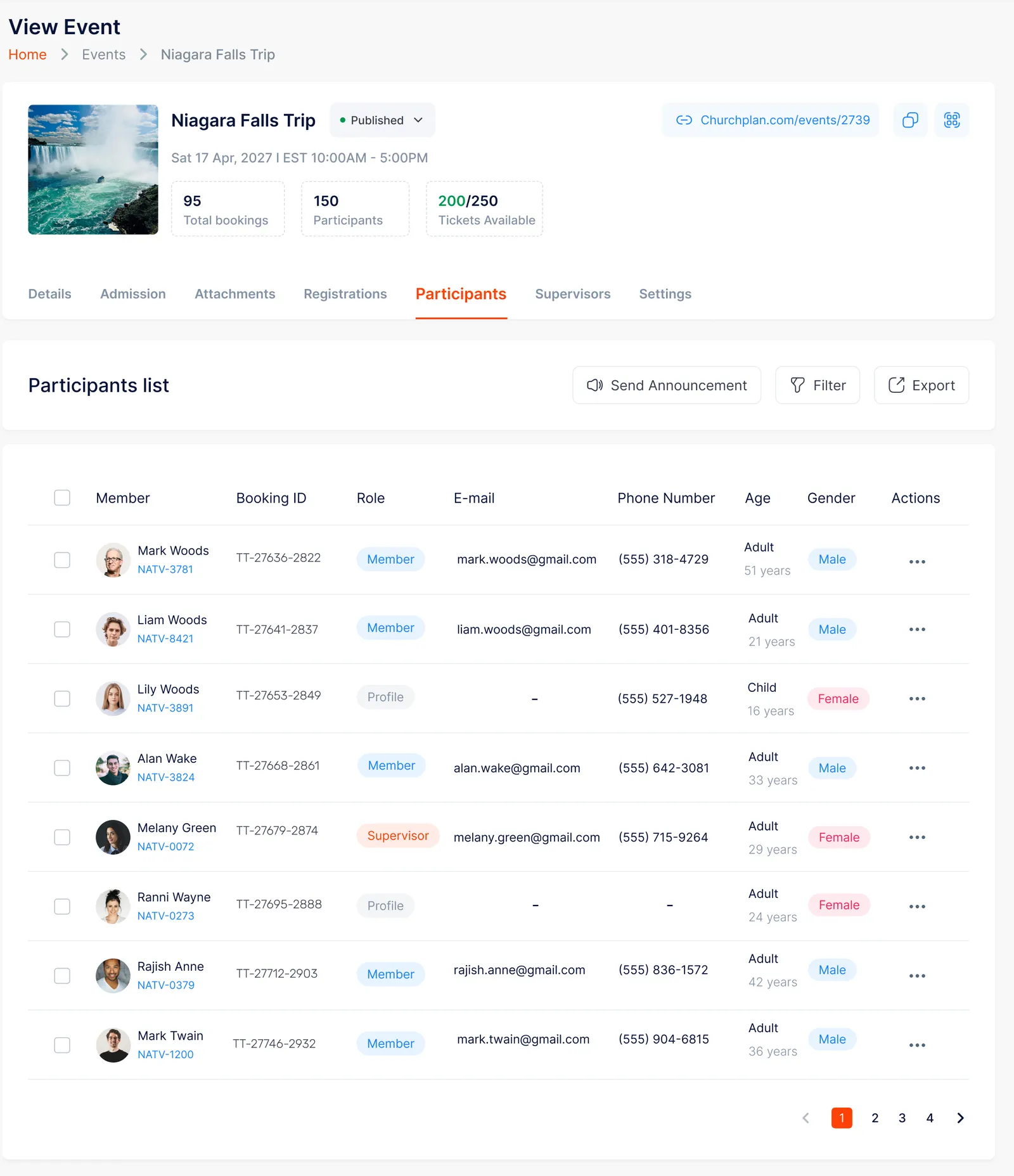
ChurchPlan admin — Niagara Falls Trip with bookings, participants, and tickets available
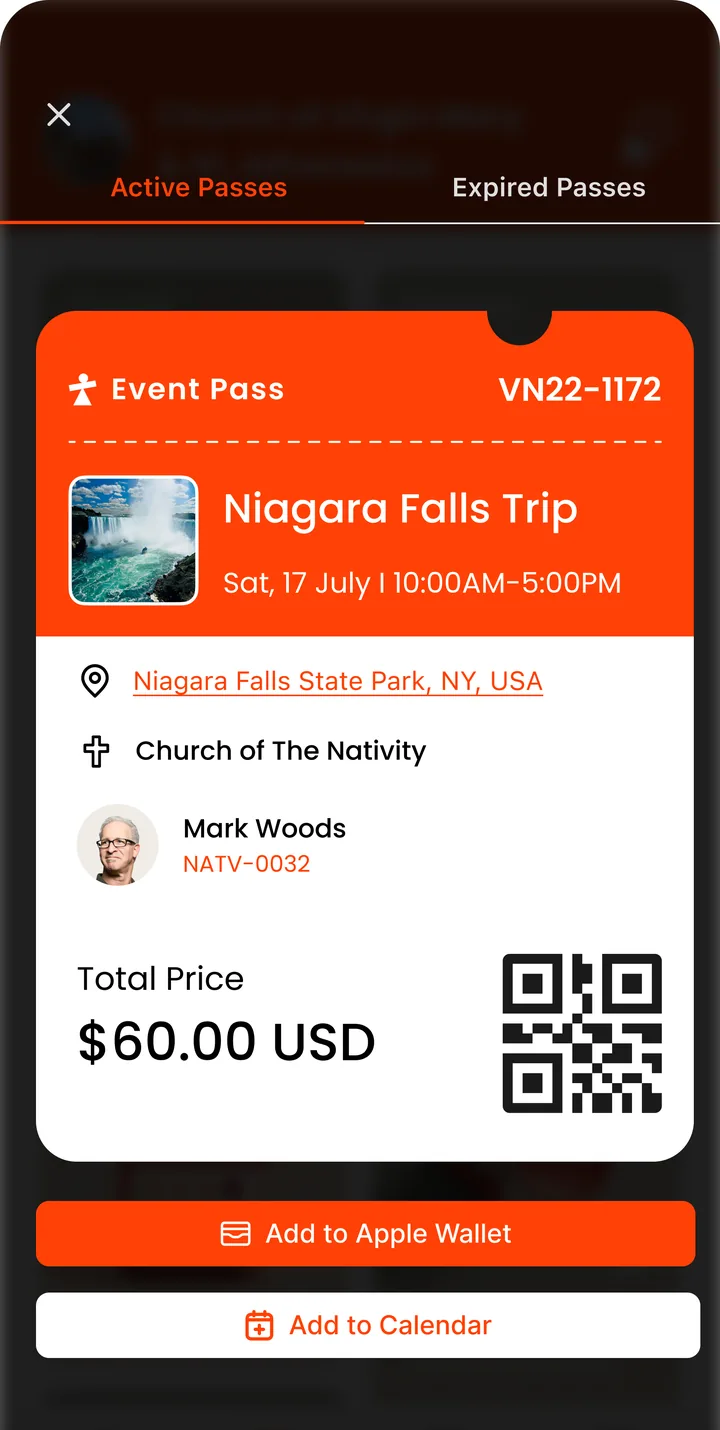
Event Pass with QR code in the ChurchPlan app
Niagara Falls Trip · $0 ticket fees
My Church · Following · Explore — your event, discoverableFamily checkout — one payment, everyone’s passApple Pay — done in a tapQR at the gate — Apple Wallet ready
The Family Flow

From the feed to the front gate — one checkout for the whole family.

No paper forms in the narthex. No “pay Maria at the door.” Mark opens ChurchPlan, ticks his kids, pays once, three passes land in Apple Wallet — and on the day, any staff phone is the scanner.
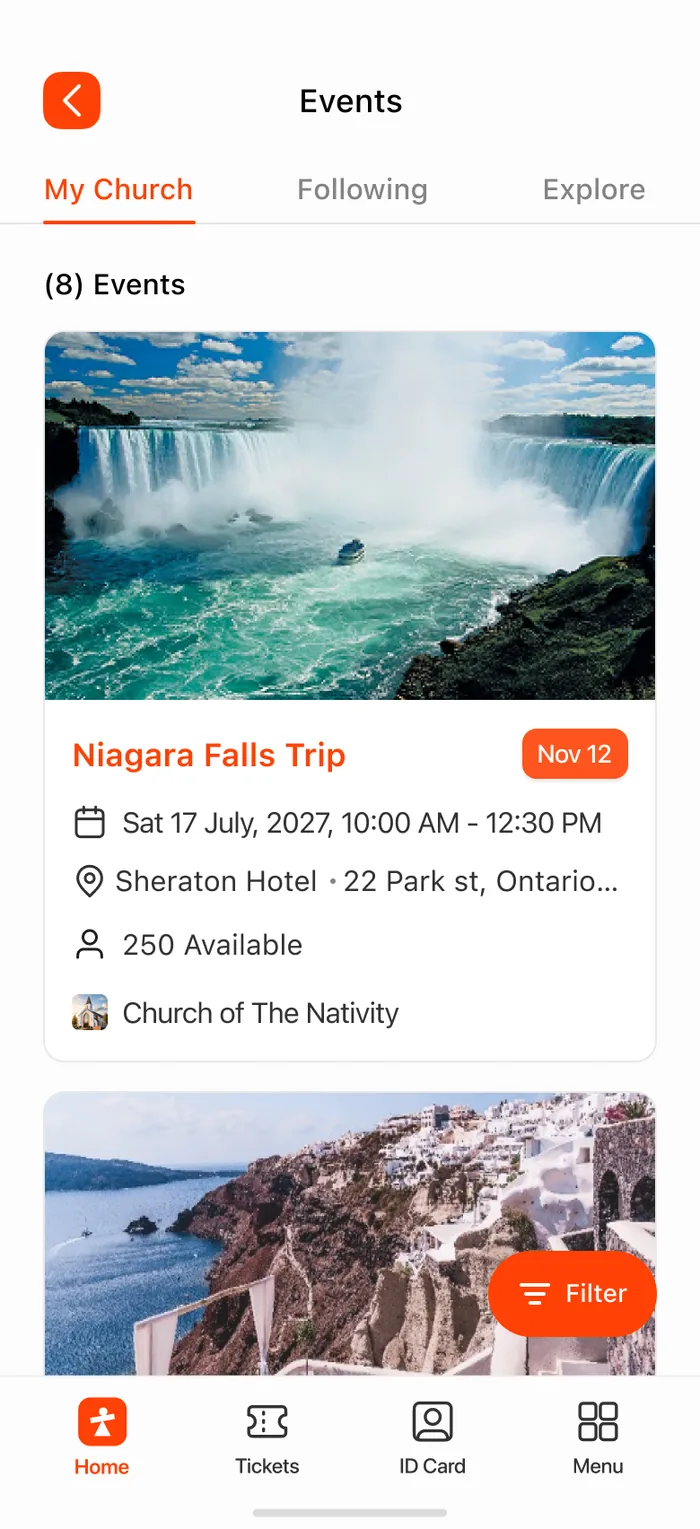
STEP 01
New event · on every phone
The Niagara Falls Trip appears in the ChurchPlan events feed
It shows up in ChurchPlan
Not a flyer. Not a Facebook post nobody saw.
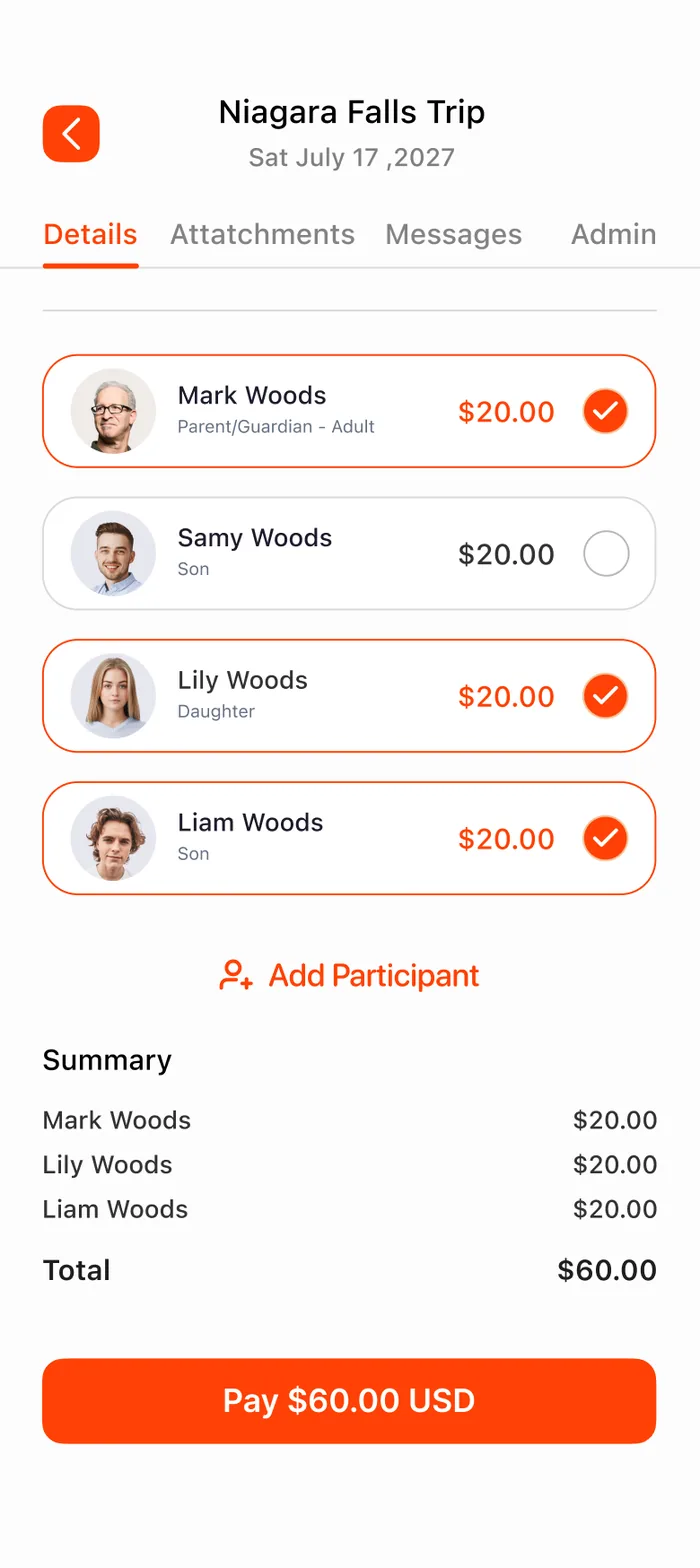
STEP 02
3 of 4 Woods · one checkout
Mark Woods registers himself, Lily and Liam in one checkout — Samy can't make it
Tick the family
Samy can't make it? Untick him. Total updates itself.
STEP 03
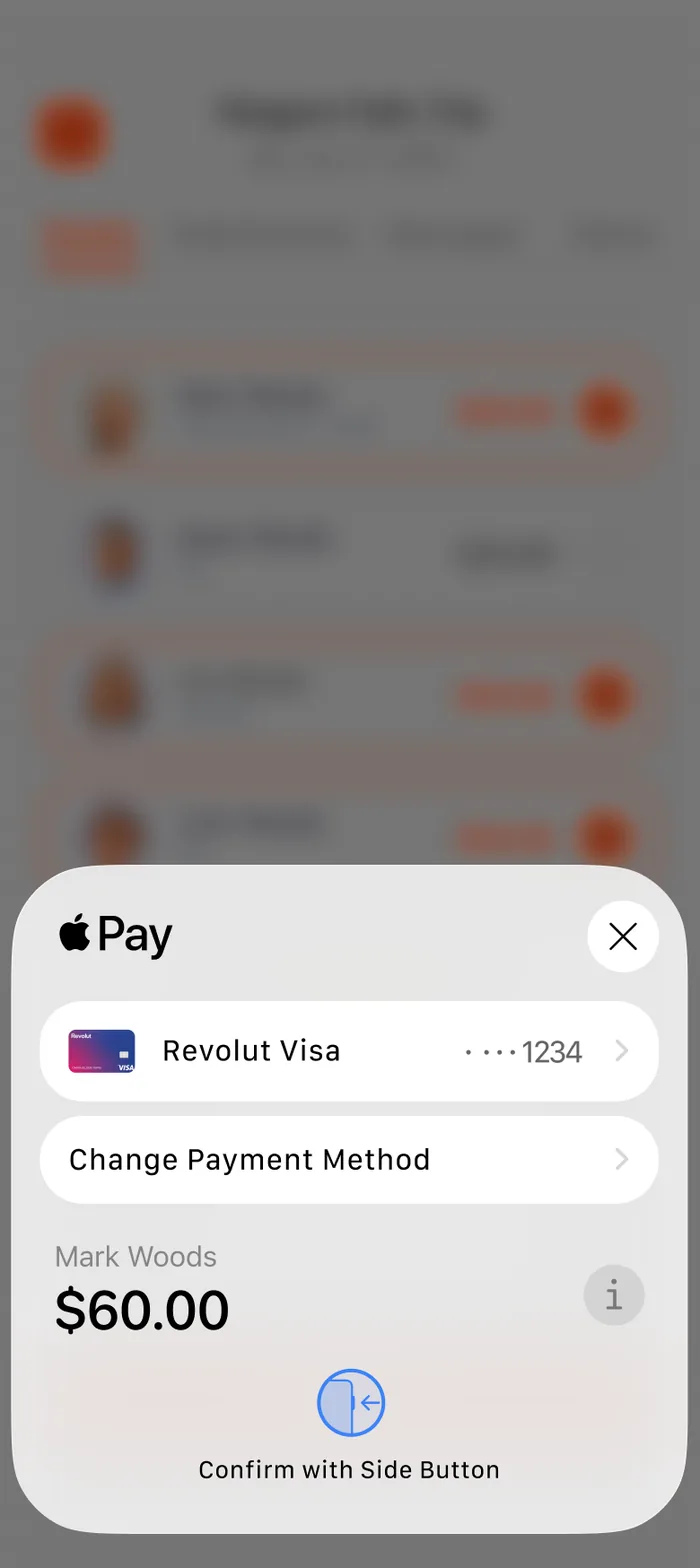
Apple Pay · $0 ticket fees
Apple Pay sheet — Mark Woods pays $60.00
Pay with a tap
No tip jar. No "cover the platform's costs" screen.
STEP 04
3 passes · Wallet ready
Event Pass VN22-1172 with QR code, Add to Apple Wallet and Add to Calendar
The pass is the ticket
One per attendee, straight to Apple Wallet.
STEP 05
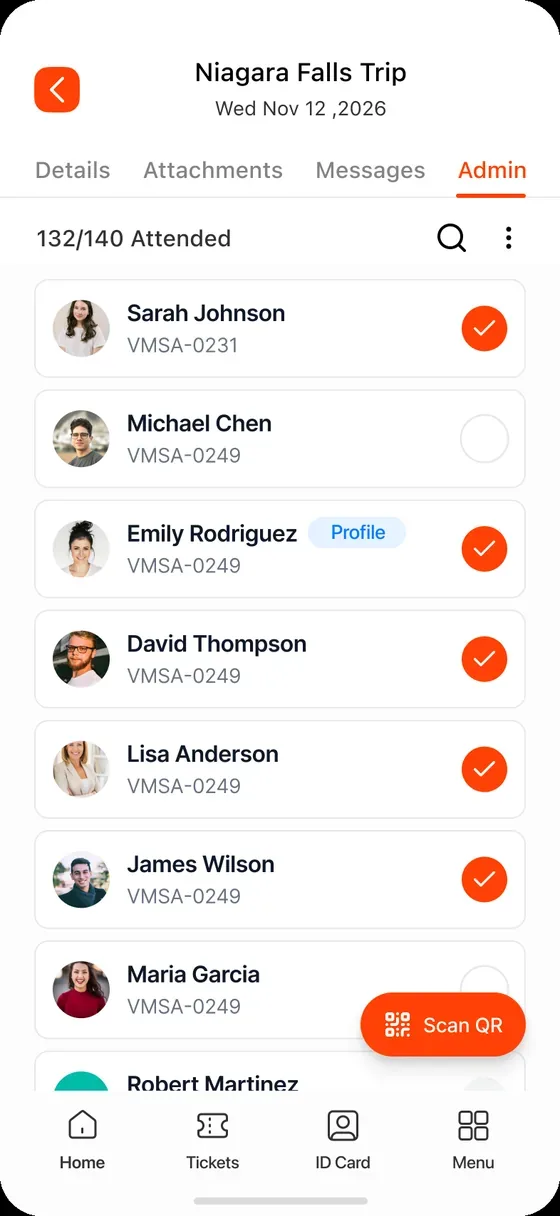
0 checked in · live
QR check-in — any staff phone becomes a scanner, headcounts update live
Scan them in at the door
Any staff phone is the scanner. Headcounts update live.
feed → family → paid → passes → scanned ↻
Sunday · 9:58 AM · At the gate
The line doesn’t stop. Neither does the welcome.
Passes scan straight from the ChurchPlan app on any staff phone — no bottleneck at the door.
The Money Difference

On other platforms, a $60 trip costs more than $60. On ChurchPlan, $60 means $60.

“Free” fundraising tools put a tip jar between your members and the parish. Typical ticketing services bury a stack of add-on charges in the checkout. ChurchPlan is funded by your subscription — never by your congregation — so the price you set is the price they pay.

Niagara Falls Trip · 3 × $20.00$60.00
Service fee$0.00
Booking fee$0.00
Convenience fee$0.00
Software fee$0.00
“Suggested tip” at checkoutnone — ever
Mark pays$60.00 USD
On a typical ticketing service, this same fee stack rings the checkout up to $78.45 — an $18.45 markup the parish never sees.* Standard card processing by Stripe still applies, as anywhere you accept cards online — kept low through volume-negotiated rates. What ChurchPlan never charges is a fee of its own on top.
No booking fee · No service fee · No convenience fee · No software fee · No registration fee · No handling fee · No fundraising fee
* Illustrative example — other-provider fees vary; ChurchPlan add-on fees are always $0.
“Free” tools — tip jar at checkoutTypical ticketing — service + booking + convenience feesChurchPlan — $0 ticket fees
Apple Pay — $60.00, no fees added
Typical ticketing service
3 × $20.00 tickets$60.00
Service · booking · convenience+$18.45
Mark pays$78.45
An $18.45 markup on the price the parish set — collected by the platform, invisible to the church.*
“Free” tip platform
3 × $20.00 tickets$60.00
“Suggested tip” · 20%+$12.00
Mark pays$72.00
$0 on the church’s invoice — because Mark is asked to fund the tech company at checkout.*
ChurchPlan
3 × $20.00 tickets$60.00
Add-on fees & tips$0.00
Mark pays$60.00
The price the church set is the price the family pays. Funded by the subscription — never the congregation.
Before the doors open

Publish a polished event in minutes.

A six-step builder walks you through details, admission, supervisors, attachments and settings — then publishes to the app with an optional push notification. No event goes out half-finished.
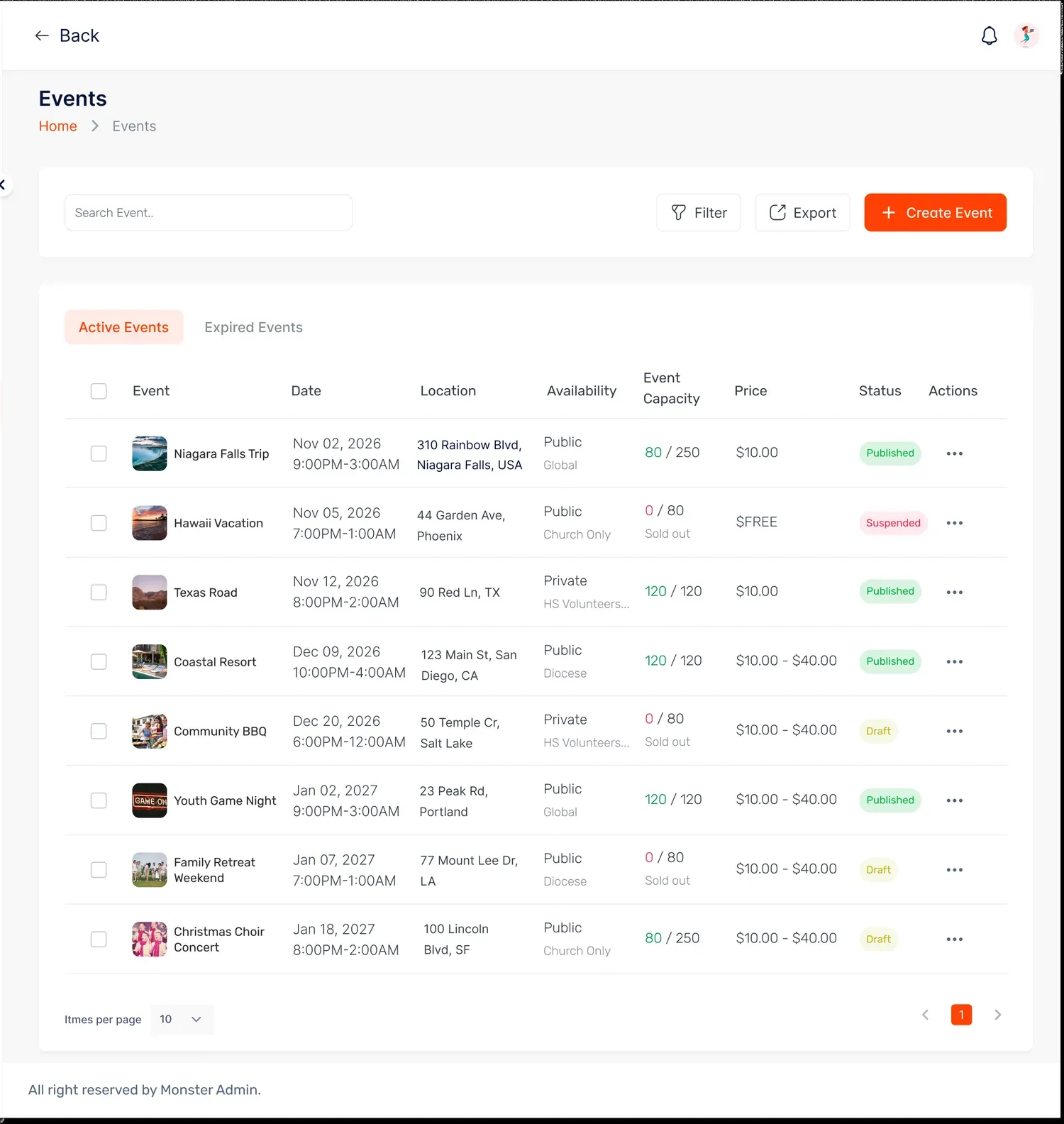
churchplan.com/admin — Events
Events dashboard — status, availability and revenue at a glance
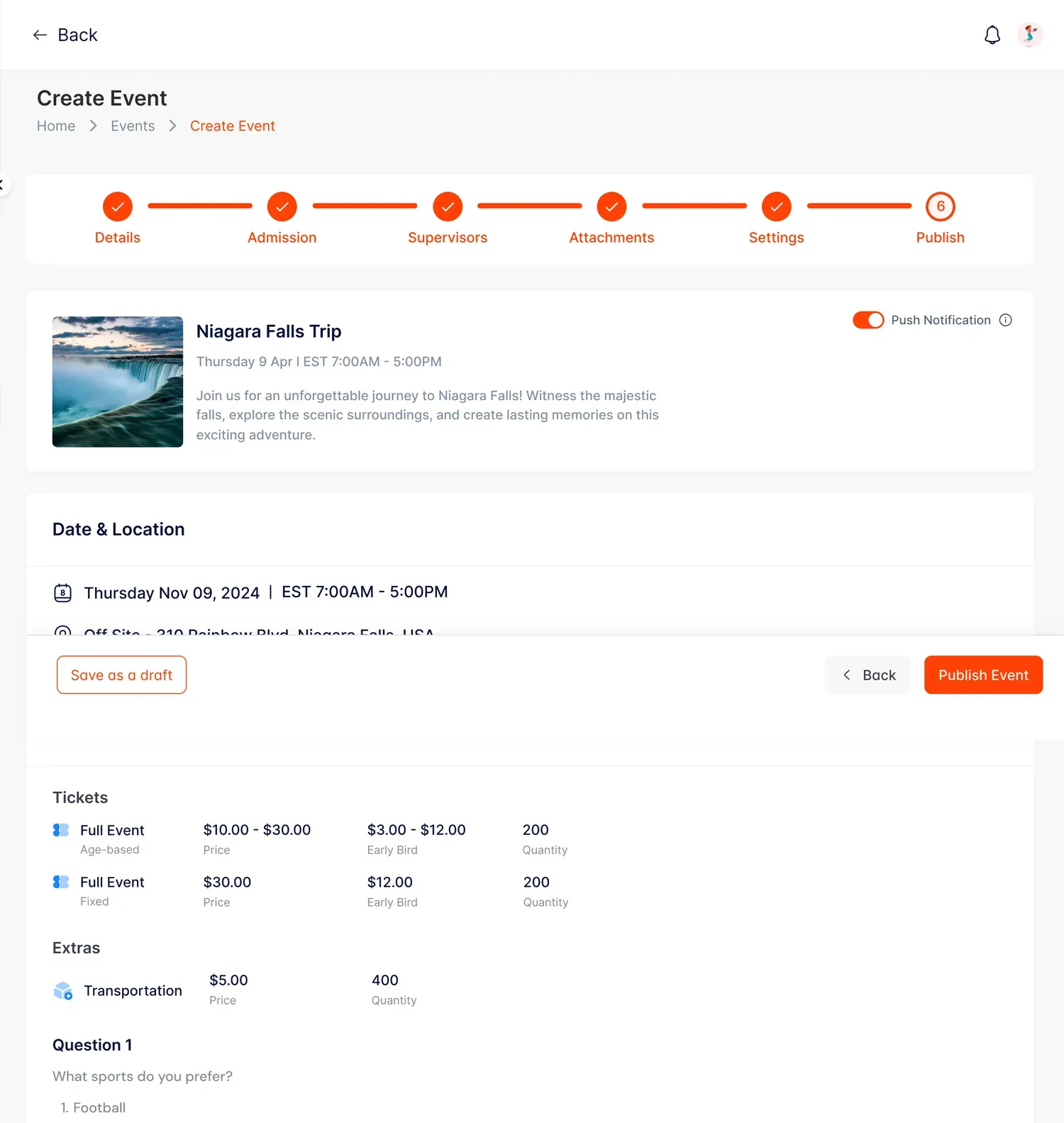
churchplan.com/admin — Events · Create
Six-step event builder — Details, Admission, Supervisors, Attachments, Settings, Publish

One dashboard for every event. Volunteers, childcare, capacity and ticketing in one place — status, availability and revenue at a glance. No third-party ticketing apps.

Step-by-step, nothing forgotten. Details → Admission → Supervisors → Attachments → Settings → Publish.

Flexible pricing. Age-based or fixed tickets, early-bird rates, extras and capacity — free events stay free, with no ticket cap surprises.

Draft, publish, notify. Save drafts until you’re ready — then push a notification to exactly the right ministries the moment it goes live.

Booking confirmed · Apple & Google Wallet
The ticket that never gets lost.
Passes land straight in the phone’s wallet — QR-ready at the door. No printouts, no screenshots.
On the day — and after

They tap once. You see everything.

Every family checkout becomes a booking you can see, message, staff, and — when plans change — refund in one click.
churchplan.com/admin — Niagara Falls Trip · Participants
Participants list — 95 bookings, 150 participants, 200 of 250 tickets available
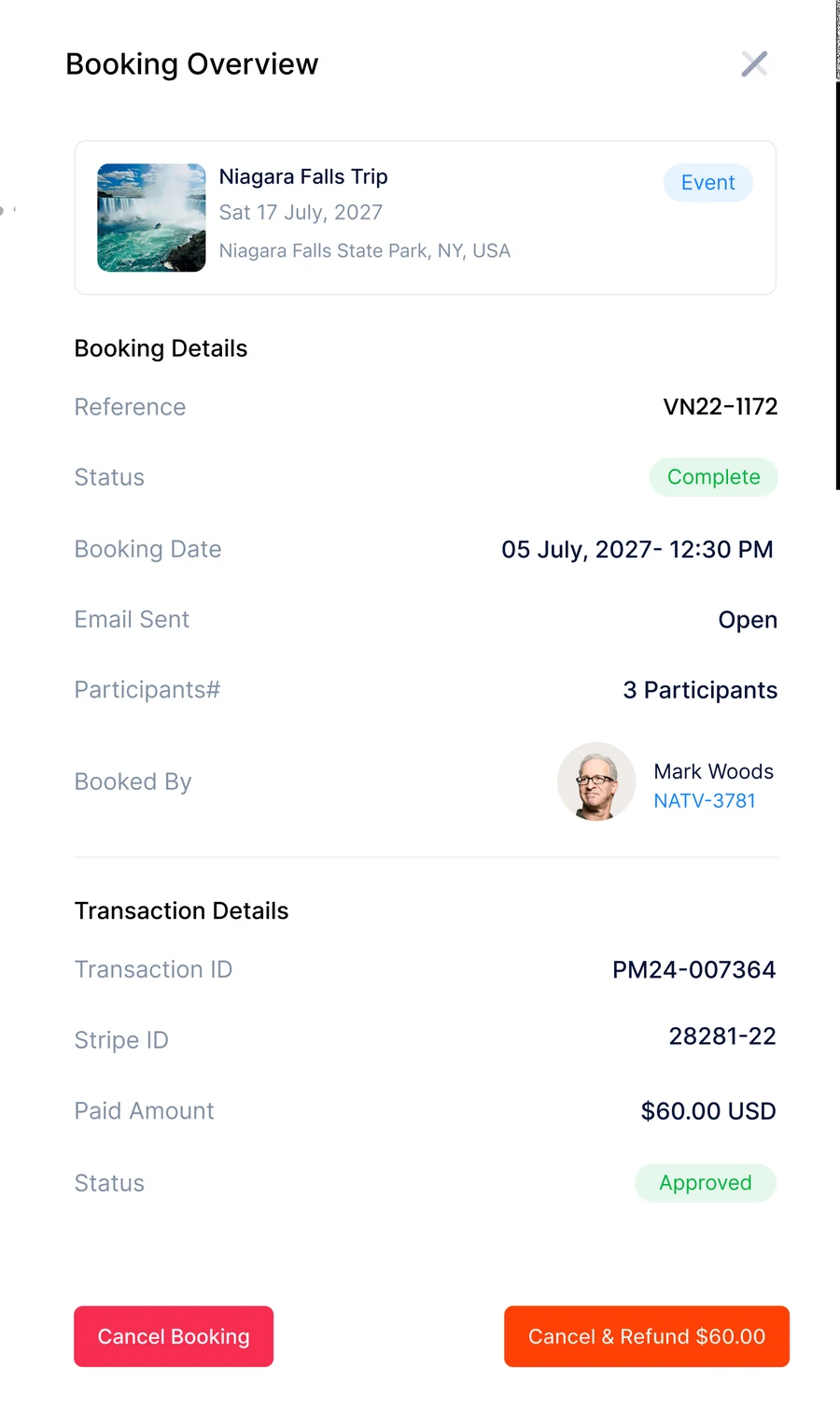
Booking overview — Mark Woods, 3 participants, $60.00 approved, Cancel & Refund in one click

The trip at a glance. 95 bookings, 150 participants, 200 of 250 tickets left — live, not in a spreadsheet you rebuilt on Saturday.

Refunds without the phone tree. Open the booking, see the Stripe transaction, and Cancel & Refund $60.00 in one click. The Woods get their money back before they’ve finished apologizing.

Announcements that reach exactly the right people. “Bus leaves at 9:30, not 10” goes to the 150 going — not the whole parish.

Roles, ages, supervisors. Melany is marked Supervisor, Lily is 16 and rides with a guardian — the bus list exports itself.

Built for families

One parent, one checkout, everyone's pass. Kids without email addresses still get a ticket under the family booking — and show up properly on your participant list.

Add ParticipantParent/GuardianChild · 16 years

Refunds in one click

Every booking shows its Stripe transaction right there. Cancel, or cancel & refund — no support ticket, no “we’ll mail a cheque,” no awkward Sunday conversation.

ApprovedStripe ID 28281-22Cancel & Refund $60.00

Passes that work at the gate

Every registration issues a QR pass — scannable at the door, one tap into Apple Wallet, one tap onto the calendar. Reference numbers match the admin, to the digit.

VN22-1172Apple WalletAdd to Calendar
My Church · Following · Explore

Your events don’t wait to be found. They show up.

Every member’s Events feed has three tabs — and your trip is in all the right ones.

My Church — your parish’s events, front and center for every member, with live ticket availability.

Following — members who follow a sister parish see its events too. Diocese-wide trips fill faster.

Explore — newcomers browsing nearby churches find your open events before they’ve found your front door.

Booking windows — “Booking starts Saturday July 3rd” builds the queue before a single ticket moves.

Explore and Following show only the events you set to public — everything is private by default, one switch per event, reversible any time. How visibility works →
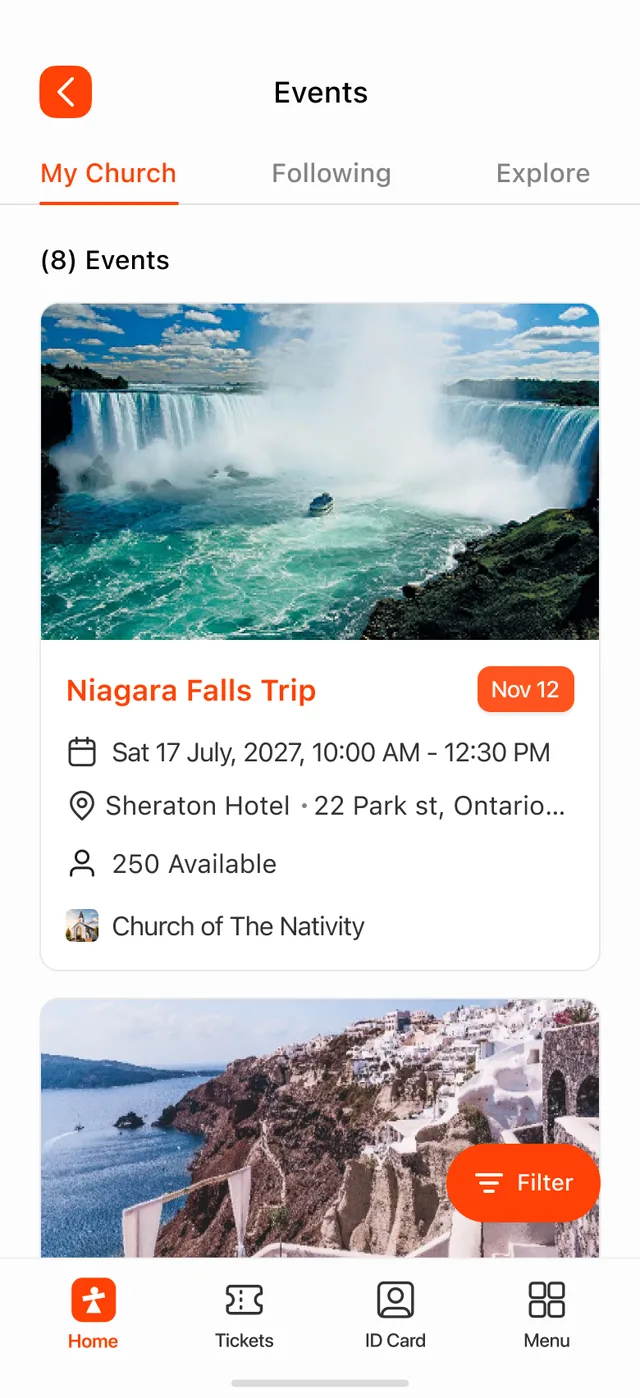
Events feed — My Church, Following and Explore tabs, with the Niagara Falls Trip

Your next trip could be booking itself.

Publish the event, share nothing, chase nobody. Families register themselves, passes issue themselves, and the money arrives without a tip jar in the way.

Free forever on Essentials · No credit card · $0 ticket fees